|
|
Gents,
I hope this doesn't sound like an advertisement, but I wanted to share with you a pretty handy tool that I have been using.
Check out: http://www.foreflight.com/ I bought it for my iPhone originally (I think it's about $75/year). I used it mostly for weather information (I live in Seattle), but it offered lots of other capability as well. The only problem was the small size of the iPhone -- even though you could easily zoom in -- not ideal.
Then the iPad came out and the ForeFlight services can be used on the iPad at no extra charge if you have a subscription for the iPhone.
If you have an internet connection, you can look up any chart or approach plate in the country. OR, you can save the information on your iPad/iPhone internal memory to take airborne with you.
ForeFlight offers Airport Diagrams, Terminal Procedures, VFR Charts, IFR High and Low charts, and lots of Real-Time WX info maps: Radar, Satellite, Flight Rules, Wind, Visibility, Ceiling, Sky Coverage, Temp, etc. You are notified when something becomes non-current so a new procedure, chart, etc., can be downloaded.
I just finished loading every single approach plate for every airport in the country, every airport diagram, every VFR chart, every high and low IFR chart -- everything I could find to download, so I can take it with me airborne as a back up for my paper. If I become comfortable with it, I may start to use less paper.
Downloading every possible storable chart ate up just under 10 GB. I bought a 64BG iPad so I still have lots of memory left for other things. Downloading is optional and selectable -- you can do it one state at a time or just down load approach plates for one airport, even one by one, if you are cramped for memory.
On the left below is a paper approach plate to Paine Field. On the right is the same plate on the iPad. I would say the iPad approach plate is the same size as the paper plate, but perhaps 1/2 inch at the top or bottom doesn't show. This you can easily see with a swipe of the finger. As you can see, it is pretty easy to read, at least in my study. I haven't done the direct sunlight test yet. Probably won't read as good as my old Sony Reader (which is now for sale if anyone wants it!)
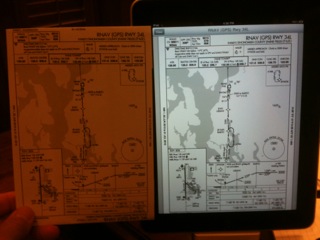
photo.JPG
A new feature is the moving map display. I haven't used it yet (just got the iPad yesterday) but you can click on the "find me" button on a chart (VFR or IFR or Weather or Whatever) and you are provided present position (like the navigation on an iPhone) as well as Groundspeed, GPS Altitude, and Track.
If you know all about ForeFlight on the iPad, please forgive this post. For me personally, I think it will alleviate some of the paper clutter in a small cockpit.
Cheers,
John Hafen
IVP 413AJ 250 hours.
|
|